dropdown menu

Showing posts with label NETWORK. Show all posts

DHCP (Dynamic Host Configuration Protocol)

DHCP (Dynamic Host Configuration Protocol) 

DHCP allows to get an IP address and other network parameters, like gateway, DNS server IP, subnet mask etc. (It is a client - server setup.)

The DHCP facility assigns an IP address for a specified period of time known as a lease, using the following process:
- The requesting (client) system broadcasts a DHCP Discover message to UDP port 67. At this point, the system does not need to know anything about the local network, not even the subnet mask (the source address for this message is 0.0.0.0, and the destination is 255.255.255.255).

- One or more DHCP servers reply with a DHCP Offer message (to UDP port 68), containing an IP address, subnet mask, server IP address, and lease duration (and possibly other parameters). The server reserves the offered address until it is accepted or rejected by the requesting client or a timeout period expires.

- The client selects an offered IP address and broadcasts a DHCP Request message. All servers other than the successful one release the pending reservation.

- The selected server sends a DHCP Acknowledge message to the client.

- When the lease is 50% expired, the client attempts to renew it (via another DHCP Request). If it cannot do so at that time, it will try when it reaches 87.5% of the lease period; if the second renewal attempt also fails, the client looks for a new server. During the lease period, DHCP-assigned parameters persist across boots on most systems. On some systems, the client tries to extend its lease each time it boots.


dhcpcd: dhcp client daemon
dhcprd: dhcp relay agent daemon (usually routers are configured to pass the dhcp requests/replies to different networks and or subnets, so dhcprd is not used)
dhcpsd: dhcp server daemon


The DHCP client daemon is dhcpcd. The daemon runs on port 68..
The DHCP client configuration file is /etc/dhcpcd.ini


/etc/options.file       <--contains dhcp option definitions


In /etc/rc.tcpip:
# Start up dhcpcd daemon
start /usr/sbin/dhcpcd "$src_running"

# lssrc -ls dhcpcd
LogFileName:     /usr/tmp/dhcpcd.log
Logging:         ENABLED
Tracing:         NOT ACTIVE
Interface        IP Address     Duration  Start     End
en0              17.16.116.115  3600       1527666340 1527669940
Subsystem         Group            PID          Status
 dhcpcd           tcpip            3538946      active


more details:
https://technet.microsoft.com/pt-pt/library/cc780760(v=ws.10).aspx

------------------------------------

/etc/dhcpcd.ini

The DHCP client configuration file is /etc/dhcpcd.ini
It contains the configuration information for the DHCP client program (dhcpcd).

Common DHCP Options:
1  Netmask
3  Default gateway
6  Nameserver
12 DHCP Client hostname
15 Domain name

119 is the search domain suffix list, but AIX does not support this :(

syntax used in this file:
option <code value> -- An option requested by the client (if it is inside the curly braces, it is valid for the mentioned interface only, if outside then applies to all interfaces)
reject <code>       -- Specifies that if this option code is returned by the server, this option should be ignored by the client. Its value should not be used.

After dhcpcd.ini is configured, the dhcp client daemon (dhcpcd) should be started, which will read this file during start up:
# startsrc -s dhcpcd

------------------------------------

dhcp and resolv.conf

an example from dhcpcd.ini:
interface en0
{
option 12 "my-aix-hostname"
}


If using above setting, dhcp will update resolv.conf with domain and nameserver details. Additionally hostname will be set (to FQDN: my-aix-hostname.example.domain), also gateway will be configured and netmask as well. Only the search list will not inserted into resolv.conf, that would be option 119 in dhcpcd.ini, but IBM does not support that.

Some additional details regarding search vs domain entry in resolv.conf:
The domain entry and search entry are mutually exclusive. If both entries are used, the one that appears last will override the other. The search entry can have up to a maximum of 1024 characater strings for the DomainName variable. The first DomainName variable is interpreted as the default domain name.

------------------------------------

example from /etc/dhcpcd.ini:

updateDNS "/usr/sbin/dhcpaction '%s' '%s' '%s' '%s' A NONIM >> /tmp/updns.out 2>&1 "      <--it requestes to update the DNS server with the new IP address
clientid MAC                                             <-- client id to use in all communication with server
                                                         (MAC: MAC address, HOSTNAME: host name should be used as client id)

interface en0                                            <--interface for DHCP (I have seen "any" as well)
{
option 1 255.255.255.0                                   <--specified netmask is requested/accepted
reject 3                                                 <-- Do not accept the default gateway
reject 6                                                 <-- Do not accept the nameserver
reject 15                                                <-- Do not accept the domain name
otheroptions accept                                      <-- Specifies how all other options should be handled (default is all accepted)
                                                         (it refers to any options not specifically mentioned)
}

------------------------------------

our new config:
interface en0
{
option 12 "my-hostname"
}

-----------------

our older configs:
interface en0
{
option 12 "my-hostname"                              <--this line will register server in DNS
option 15 "our.example.domain.com"
option 19 0
option 20 0

In this older config, hostname will looks like: my-hostname.our.example.domain.com, which is hardcoded, and if we migrate server to another domain, it will still have that wrong FQDN locally.

------------------------------------

NETWORK - DSH

DSH (Distributed Shell):

DSH is a tool for running commands on a list of AIX servers parallel (no long running for cycle is needed to go through on a list of servers, but the command will be executed instantly on all servers). DSH is installed by default in AIX and it can be configured to use rsh or ssh. (By default the maximum number of concurrently run execution is 64. This can be controlled by -f flag. If it is set to 1, that is similar to serial execution.)

# lslpp -L csm.dsh
Fileset                      Level  State  Type  Description (Uninstaller)
----------------------------------------------------------------------------
csm.dsh                    1.7.1.5    C     F    Cluster Systems Management Dsh


# ls -l /usr/bin/dsh
lrwxrwxrwx    1 bin      bin              16 Jul 22 2009  /usr/bin/dsh -> /opt/csm/bin/dsh


Commands which available with this fileset: dsh, dcp, dping, dshbak

dsh: remote command execution (as ssh)
dcp: remote copy (as scp)
dping: ping utility (list of servers can be pinged at the same time)
dshbak: it formats the output (for better verview)

(SSH key should be distributed, so no password will be asked during the dsh session.)

-------------------------------------------

DSH config:

dsh needs to know what to use for remote session (ssh or rsh) and it needs a node list file as well.

To configure them these variables are needed:
(these can be put in .kshrc file, so not needed to configure each time)

export DSH_NODE_LIST=/bb/AIX_list                    <--file contains the list of servers

export DCP_NODE_RCP=/usr/bin/scp                     <--which command to use for remote copy
export DCP_NODE_OPTS="-oStrictHostKeyChecking=no -q"   <--which flags to add for remote copy command (-q will suppress banner)

export DSH_NODE_RSH=/usr/bin/ssh                     <--which command to use for remote command execution
export DSH_NODE_OPTS="-oStrictHostKeyChecking=no -q"   <--which flags to add for remote command execution (-q will suppress banner)

export DSH_LOG=/bb/dsh.log                          <--where to log (only if needed)

-------------------------------------------

Sample output: Finding which LPAR is holding the optical drive:

# dsh lsdev -Cc cdrom|dshbak
HOST: aix1
--------------
cd0 Available Virtual SCSI Optical Served by VIO Server

HOST: aix2
---------
cd0 Defined  Virtual SCSI Optical Served by VIO Server

HOST: aix3
---------
cd0 Defined  Virtual SCSI Optical Served by VIO Server


Something like this can be put in .kshrc as well, so switching between server lists is easier:
alias dsh_test='export DSH_NODE_LIST=/bb/dsh_test'
alias dsh_dev='export DSH_NODE_LIST=/bb/dsh_dev'
alias dsh_prod='export DSH_NODE_LIST=/bb/dsh_prod'

-------------------------------------------

dsh -q displays the values of the dsh variables (DSH_NODE_LIST, DCP_NODE_RCP...)
dsh <command> runs comamnd on each server in DSH_NODE_LIST
dsh <command> | dshbak      same as above, just formats output to separate each host
dsh -w aix1,aix2 <command> execute command on the given servers (dsh -w aix1,aix2 "oslevel -s")
dsh -e <script>            to run the given script on each server
                         (for me it was faster to dcp and after run the script with dsh on the remote server)

dcp <file> <location>       copies a file to the given location (without location home dir will be used)

dping -n aix1, aix2 do a ping on the listed servers
dping -f <filename> do a ping for all servers given in the file (-f)

-------------------------------------------

-------------------------------------------

-------------------------------------------


PSSH (Parallel SSH)

Parallel SSH utility is similar to DSH, the commands can be run on several hosts at the same time.

Installation package (rpm) can be found on perzl.org, but it has a dependency: python
(If there are some problems during install, you can try manually copy the parallel SSH binaries to any location from which you want to run them)

To run pssh a hosts file is needed, which contains the list of hosts where commands will be executed.

# pssh -h <hostlist> -i <command>
 
     -h   hosts file, it can conatin port or user as well (each line "[user@]host[:port]")
     -i   displays output on screen (inline on screen)
     -l   username (OPTIONAL)
     -p   max number of parallel threads (OPTIONAL)
     -o   outdir  output directory for stdout files (OPTIONAL)
     -t   timeout timeout in seconds to do ssh to a host (OPTIONAL)
     -v   verbose turn on warning and diagnostic messages (OPTIONAL)
     -O   options SSH options (OPTIONAL)


pssh -i -h hosts.txt echo "hello, world" print "hello, world" from each host specified in the file hosts.txt:
pssh -i -h hosts.txt -l root "oslevel -s" run a command as root
pssh -i -h hosts.txt -t 0 sleep 10000 run a command without timing out (or if you want timeout change the value of -t)
pssh -i -h hosts.txt -p 100 "uptime" if hosts.txt has 100 server, parallelism can be set to 100 to ensure concurrent run
pssh -i -h hosts.txt -x "-O StrictHostKeyChecking=no -O UserKnownHostsFile=/dev/null" echo hi     run pssh to use ssh options
pssh -i -h hosts.txt -I < script.sh run a script on each server (-I tells read commands from standard input)
                                         ("< script.sh" feeds this script, without copying it to each server)


-------------------------------------------

PSCP:

It can copy files to multiple hosts (similar to dscp)

pscp -h <hostlist> <file> <location>
 
     -h   hosts file (each line "[user@]host[:port]")
     -r   ecusively copy directories (OPTIONAL)
     -l   username (OPTIONAL)
     -p   max number of parallel threads (OPTIONAL)
     -t   imeout   timeout in seconds to do scp to a host (OPTIONAL)
     -O   options   SSH options (OPTIONAL)


pscp -h hosts.txt script.sh /tmp/script.sh copy script.sh to /tmp on each server listed in hosts.txt

NETWORK - NETCD

NETCD (Network Caching Daemon):

AIX v6.1 introduced the network caching daemon (netcd), which can be configured to cache answers from DNS, NIS, etc. to improve performance and also reduce network traffic.

Applications requiring name resolution place a request to the resolver to do the translation. The resolver does this translation by looking up on the local machine (for example, /etc/hosts) or on a remote machine that provides a name resolution service (for example, DNS or NIS). Netcd daemon can be used to cache the resolver lookups.

The netcd daemon will maintain two types of caches:

-Local resources, such as /etc/hosts:
Local resources are loaded into local caches at the startup of the netcddaemon. Local caches contain all entries. The netcddaemon will periodically check if the local resources have changed and if necessary reload them.

-Network resources, such as DNS:
In contrast to local caches, the network caches are created with empty entries during the daemon startup. The netcddaemon will fill up the cache with the result of each query at runtime. Negative answers from the resource are cached as well. For DNS queries, the TTL (time to live) value returned by the DNS server is used with the default settings. The netcddaemon will check periodically for expired entries and remove them.

---------------------------------

Configuration of netcd:

The netcddaemon is delivered as part of the bos.net.tcp.client package. You can start netcd with startsrc: startsrc -s netcd

The netcd daemon will look for /etc/netcd.conf to use as its configuration file by default. If a configuration file is not detected, netcd will use its default values, which will cache all possible data with a hash size of 128 and time to live (TTL) of 60 minutes.

The /etc/netcd.conf file does not exist initially, so if this is your first time, you will need to create a new netcd.conf file.

Add this line to netcd.conf to cache DNS data: cache dns hosts 128 0

It will cache up to 128 DNS answers. A TTL of zero for DNS means to observe the TTL in the answer from the name server, instead of overwriting it.

A netcd sample configuration file is installed in /usr/samples/tcpip/netcd.conf. You can copy the file to the /etc/ directory and use it as a template for your configuration.

---------------------------------

The /etc/netcd.conf file has four different types of configurations:

1. Caching settings: You can specify what resolver should be cached:

    # cache <type_of_cache> <type_of_map> <hash_size> <cache_ttl>
    (default setting: cache all all 128 60)
    (example for a DNS cache: cache dns hosts 128 0)

    type_of_cache     Declares the type of cache. Possible values are all, local, dns, nis, nisplus, and yp.
    type_of_map       Declares the map to be used to do the lookup. Check netcd.conf man page or look at the sample file for a complete list.
    hash_size         Specifies the number of lines used for the cache. (An hash table is used to store the cache)
    cache_ttl         Declares the time to life for a cache entry. The unit is minutes. The TTL is not used for local resource caches.
                      If you specify a value other than 0 for DNS caches, it will overwrite the TTL of the DNS server response.


2. Security settings:

You can specify under which user and group a netcddaemon should be run. The default user is root and the default group is system.

3. Log level settings:
The netcddaemon creates a log file in /var/tmp/netcd.log. You can specify a different log file location, a log file size limit in KB, and the number of log file rotations. The default setting is no size limit and therefore no rotations are taken.

    Use this syntax to change the settings:
    log_file <file>
    log_rotate <number>
    log_size <number>

  
4. Daemon settings
    net_scan_frequency      Specifies how often netcddaemon looks for expired cache entries in network caches. The unit is min., default is 1.
    local_scan_frequency    Specifies how often the netcddaemon checks for changes to the local resources. The unit is minutes, default is 1.
    socket_queue_size       Indicates the message queue size. The unit is the number of outstanding requests, default value is 256.

---------------------------------

Commands:

/usr/sbin/netcd               netcddaemon itself
/usr/sbin/netcdctrl           command to manage netcddaemon caches (dumping, flushing, changing the logging level, and display statistics.
/usr/samples/tcpip/netcd.conf sample configuration file for the netcddaemon.
/var/tmp/netcd.log            netcd log file

startsrc/stopsrc -s netcd     starts/stops netcd (refresh command is not supported)
lssrc -ls netcd               shows an overview of the currently active config

netcdctrl -t dns -e hosts -a /tmp/netcd.cache.out    dump DNS cache to a text file
netcdctrl -t dns -e hosts -s /tmp/netcd.cache.out    shows statistics of cache usage (directs output to the given file) (hash_size can be verified with this)
netcdctrl -t dns -e hosts -f                    flush the caches (if you flush the local resources cache, it will be reloaded automatically)
netcdctrl -t local -e hosts -f                  if you changed /etc/hosts with this command you can notify netcd daemon immediately
netcdctrl -l 7                                  changing the logging level of netcd daemon (dynamic action, no restart is needed)
                                                0 <--No logging
                                                3 <--(the default) Errors (the default)
                                                4 <--Warnings
                                                5 <--Notice
                                                6 <--Info
                                                7 <--Debug


some more info: https://www.ibm.com/developerworks/mydeveloperworks/blogs/cgaix/entry/aix_6_1_resolv_conf_and_netcd?lang=en

NETWORK - SSH

SSH (SECURE SHELL)

SSH is sensitive to write permissions on home and ssh dirs. (Sometimes the solution can be if group and other write permissions are removed.) 

/etc/ssh/sshd_config                                     <-- at the beginning of the file shows the protocol version (1 or 2)
/usser_home_dir                                          <-- only owner has write permission (700 or 750 or 755)
/usser_home_dir/.ssh                                     <---right should be 700
/usser_home_dir/.ssh/id_dsa                              <-- right should be 600
/usser_home_dir/.ssh/authorized_keys                     <-- rights should be 600

If in sshd_config file: StrictModes yes, then sshd will check ownership of the user's files and home directory before accepting login.
In this case, user home directory should have maximum 755 rights.

ssh-keygen -R hostname 
                                  <--this will remove that host from the known_host file
ssh -t reachable_host ssh unreachable_host               <--if host is available only from another host, you can reach it from local computer
ssh host -l user “`cat cmd.txt`”                         <--run complex remote shell cmds over ssh, without escaping quotes
ssh -o PreferredAuthentications=password -l <user> <host> <--this will try to login with password (it won't use ssh key)

cat file.tar | ssh server_C 'cat > /copy_dir/file.tar'   <--very fast file transfer to server_C (faster than scp)

copy a file from server A to server C through server B  (if copy is not possible directly between A <-> C ):
cat < file | ssh B "ssh C \"cd dir && cat > file\""      <--command from server A: (A-->B-->C)
scp -3 user@A:file uer@B:file                            <--command from server B (not all version has -3 option)
ssh A 'cat path_to_file' | ssh C 'cat > path_to_file'    <--command from server B
(if some output directed into the file (because of cat command), you can use ssh -q or ... >/dev/null 2>&1)
ssh -o StrictHostKeyChecking=no -o "UserKnownHostsFile=/dev/null" -o ConnectTimeout=10 -o LogLevel=ERROR user@host  <--good for scripting

----------------------------------

Generating key pairs

I want to log in from Node A as user bubba, to Node B as user root

1. on Node A as bubba: ssh-keygen -b 1024 -t rsa         <--this will generate private and public keys under .ssh (id_rsa, id_rsa.pub)
    or: ssh-keygen -t dsa                                -b: bit size, -t: rsa or dsa
2. on Node B: copy id_rsa.pub to authorized_keys2        <--the contents should be added to  authorized_keys2 or authorized_keys
3. on Noda A as bubba: ssh root@Node B                   <--now login is possible without password,
                                                         on Node A id_rsa file should be in .ssh, otherwise login will fail.

OpenSSH 7.0 and higher no longer accept DSA keys by default, and for higher security you can use 2048 bits keys:
ssh-keygen -t rsa -b 2048
-----------------------------------

If SSH protocol 1 is needed:


1. in /etc/ssh/sshd_config: Protocol 2,1                 <--this will enable both versions
2. ssh-keygen -t rsa1                                    <--this will create: identity, identity.pub files with protocol version 1
3. identity.pub should be inserted to authorized_keys file
4. ssh -1 corona@10.20.40.34                             <--this will force ssh to use protocol 1

-----------------------------------

ssh -i ~/.ssh/id_dsa.user12 150.200.200.48 -l user123    <--specify which identity you want to use

-----------------------------------

setting a default ssh user for login:

i.e: ssh hmc400                                          <--it will automatically login as hscroot because of the config file

root@aix40: / # cat .ssh/config
Compression     yes
Protocol        2

Host hmc*
        User    hscroot

Host localhost
Port 9999

-----------------------------------

SSH port forwarding (tunneling):
(There are local and remote port forwarding, usually local is needed.)

local port forwarding:
Befor setting up the tunnel make sure sshd_config file is correct. If the AllowTCPIPForward is on "no", then tunnel is not possibe (it should be set to yes)

syntax:
(ssh -L localport:host:hostport user@ssh_server -N)
ssh -L localport:want_to_reach_host:want_to_reach_hostport user@relay_server -N

-L           - specifies local port forwarding
localport    - local port (chose a port that is not in use by other service)
host         - server that has the port (hostport) that you want to forward
hostport     - remote port
-N           - do not execute a remote command, (you will not have the shell, if -N omitted we will get a shell as well)
user         - user that have ssh access to the ssh server (computer)
ssh_server   - the ssh server that will be used for forwarding/tunneling

localport:host:hostport
Specifies that the given localport on the local (client) host is to be forwarded to the given host and port on the remote side.
This works by allocating a socket to listen to the port on the local side. Then, whenever a  connection  is  made to this port, the connection is forwarded over the secure channel and a connection is made to host,hostport from the remote machine (ssh_server, relay server).

example:
- ssh -f -N -L 10080:bb_lpar:22 root@aix31                <--set up tunnel (for ssh session) (-f: puts in background the tunnel)
- ssh root@localhost -p 10080                             <--makes a connection to the given port

-----------------------------------

ssh logging of fingerprints:

/etc/syslog.conf:
    auth.info       /var/security/sshd.log rotate files 7 time 1d
    auth.info       @sys_pmm.domain.com

refresh -s syslogd

/etc/ssh/sshd_config:
    Syslogfacility AUTH
    Loglevel DEBUG

stopsrc -s sshd; startsrc -s sshd

--------------

Fingerprint operation (shows the user):

#!/usr/bin/ksh

f1="./authorized_keys2"
f2="./out"

x=1
while [[ $x -lt 107 ]]; do

cat $f1|head -n $x|tail -1|tr -d '\r' > $f2
cat $f2 | cut -f3 -d" "

ssh-keygen -l -f $f2
(( x += 1 ))
done

-----------------------------

SSH update:
(ssl needed as well)

rpm -qa | grep ssl                 <--checking if ssl is installed as rpm (if yes, remove it :rpm -e ...)
stopsrc -s sshd
cd /mnt/SSH/openssh_openssl_5.0    <--here are both ssh+ssl softwares
smitty update_all                  <--it will update ssh
smitty install                     <--it will install ssl (because rpm has been removed earlier)
(startsrc -s sshd)                 <--usually after update sshd starts automatically, so this step not needed


freeware open ssh:
(old version must be removed)

-make copy of the ssh dir (cd /etc; ls -ld *ssh*; cp -hpr openssh ssh.old)
-smitty remove (ssl+ssh)
-check inittab (lsitab -a | grep -i ssh;rmitab rcossh)
-remove any unnecessary links (ls -l /etc/rc.openssh; unlink ssh)
-copy contents of old ssh to new dir (mkdir ssh; cp -hpr ssh.old/* ssh/; rm -rf openssh)
-smitty install (ssl+ssh)
-restart (kill -9 <sshd pid> ; startsrc -s sshd)

normal ssh:
(because of our hardening script these should be take care)
#MaxAuthTries 3
#RhostsAuthentication no

-make a copy of the ssh dir
-smitty update_all (ssl+ssh)
-stopsrc -s sshd && startsrc -s sshd
-edit sshd_config to set back the old values

-----------------------------------

SSH LOGGING:


in /etc/syslog.conf:
auth.info            /var/security/sshd.log rotate files 7 time 1d

-----------------------------------

Chroot for ssh v.4.8 or above this is needed:

1. create a user
smitty user --> bubba
--------------------

2. create necessary dirs
mkdir /chroot
cd /chroot
mkdir -p dev/pts etc usr/bin usr/sbin usr/lib/ tmp        <--cretes the needed dirs
--------------------

3. copy binaries and libraries
Make sure that the permissions on all the files created inside the chrooted directory are the same as the ones for the original directories.

which ls | xargs ldd                                      <--shows the dependencies
/usr/bin/ls needs:
         /usr/lib/libc.a(shr.o)
         /unix
         /usr/lib/libcrypt.a(shr.o)

cp /usr/bin/ls /chroot/usr/bin                            <--copy the biaries
cp /usr/lib/libc.a /usr/lib/libcrypt.a /chroot/usr/lib/   <--copy the libraries
ln -s /usr/lib/boot/unix_64 /chroot/unix                  <--creates the soft link for /unix

copy all the things what is needed: ksh, mkdir ...
--------------------

4.create necessary devices
(these should have the same major and minor numbers, permissions as in the original AIX)

ls -l /dev/tty /dev/null /dev/zero                        <--just for checking the original settings (major, minor numbers)
mknod /chroot/dev/tty c 1 0; mknod /chroot/dev/null c 2 2; mknod /chroot/dev/zero c 2 3    <--creates the devices
chmod 666 /chroot/dev/null /chroot/dev/tty /chroot/dev/zero

ls -la /dev/pts/0 /dev/pts/1 /dev/pts/2 /dev/pts/3        <--just for checking (also could be check 4 5 6...)
for i in 0 1 2 3 4 5 6 7 8 9; do mknod /chroot/dev/pts/$i c 22 $i; done
chmod go+w /chroot/dev/pts/*
chmod 622 /chroot/dev/pts/0                               <--usually this is needed to e identical with the original
--------------------

5. create user home
mkdir -p /chroot/home/bubba
chown bubba.staff /chroot/home/bubba                     <--home dir should be owned by user,
                                                         (if not this kind of error could be: ksh: /tmp/sh790656.13: cannot create)
cat /etc/passwd | grep bubba >> /chroot/etc/passwd
cat /etc/group | grep bubba >> /chroot/etc/group
--------------------

6. testing the settings
chroot /home/chroot /usr/bin/ksh                         <--this changes to chroot environment
ls                                                       <--the copied commands can be checked
touch bb                                   
exit                                                     <--this will leave chroot environment
--------------------

7. ssh config
vi /etc/ssh/sshd_config


for SSH:
Match User bubba                                         <--these should be added at the end of the config
ChrootDirectory /chroot

for SFTP:
# override default of no subsystems
Subsystem       sftp    internal-sftp                    <--this is needed for this section

Match User bubba
ChrootDirectory /chroot
ForceCommand internal-sftp
--------------------

The ChrootDirctory path, and all its components, must be root-owned directories that are not writable by any other user or group.
(Once this setting was also needed for sftp: UsePrivilegeSeparation no)


---------------------------------------------------------------------------------------
---------------------------------------------------------------------------------------


SCP:

scp source target

root@aix31: /u22/oradata # scp -r * aix40:/u22/oradata/.           <--recursive copy
scp -r -p user123@aix21:/u11/user123/my_scripts .                  <--copy the complete directory with dir itself as well
                                                                   (-r recursive)
                                                                   (-p preserves the modification times and modes of the source file)

---------------------------------------------------------------------------------------
---------------------------------------------------------------------------------------

Commands to check SSL and certificates:

$ openssl s_client -connect bitbucket.lab.domain.org:443 </dev/null
CONNECTED(00000003)
depth=3 C = SE, O = AddTrust AB, OU = AddTrust External TTP Network, CN = AddTrust External CA Root
verify error:num=19:self signed certificate in certificate chain
verify return:0
---
Certificate chain
 0 s:/C=US/postalCode=02451/ST=MA/L=Waltham/street=404 Wyman St/O=Domain LLC/OU=IaS/OU=Enterprise SSL Wildcard/CN=*.lab.domain.org
   i:/C=US/ST=DE/L=Wilmington/O=Corporation Service Company/CN=Trusted Secure Certificate Authority 5
 1 s:/C=US/ST=DE/L=Wilmington/O=Corporation Service Company/CN=Trusted Secure Certificate Authority 5
   i:/C=US/ST=New Jersey/L=Jersey City/O=The USERTRUST Network/CN=USERTrust RSA Certification Authority
 2 s:/C=US/ST=New Jersey/L=Jersey City/O=The USERTRUST Network/CN=USERTrust RSA Certification Authority
   i:/C=SE/O=AddTrust AB/OU=AddTrust External TTP Network/CN=AddTrust External CA Root
 3 s:/C=SE/O=AddTrust AB/OU=AddTrust External TTP Network/CN=AddTrust External CA Root
   i:/C=SE/O=AddTrust AB/OU=AddTrust External TTP Network/CN=AddTrust External CA Root


$ ls /etc/ssl/certs/ | grep Add
AddTrust_External_Root.pem
AddTrust_Low-Value_Services_Root.pem
AddTrust_Public_Services_Root.pem
AddTrust_Qualified_Certificates_Root.pem


# openssl x509 -in AddTrust_External_Root.pem -text < /dev/null
Certificate:
    Data:
        Version: 3 (0x2)
        Serial Number: 1 (0x1)
    Signature Algorithm: sha1WithRSAEncryption
        Issuer: C=SE, O=AddTrust AB, OU=AddTrust External TTP Network, CN=AddTrust External CA Root
        Validity
            Not Before: May 30 10:48:38 2000 GMT
            Not After : May 30 10:48:38 2020 GMT
        Subject: C=SE, O=AddTrust AB, OU=AddTrust External TTP Network, CN=AddTrust External CA Root
        Subject Public Key Info:


# curl -i https://bitbucket.lab.domain.org --cacert /etc/ssl/certs/AddTrust_External_Root.pem
HTTP/1.1 302
Server: nginx
Date: Fri, 16 Nov 2018 11:41:23 GMT
Content-Length: 0
Connection: keep-alive
X-OneAgent-JS-Injection: true
Set-Cookie: dtCookie=7F4C27A21B8BC3D9CE60FF9CE183CA87|Yml0YnVja2V0LmxhYi5keW5hdHJhY2Uub3JnfDE; Path=/; Domain=.domain.org
X-AREQUESTID: @17D9P1Tx761x9568458x3
X-ASEN: SEN-6183046
x-xss-protection: 1; mode=block
x-frame-options: SAMEORIGIN
x-content-type-options: nosniff
Pragma: no-cache
Expires: Thu, 01 Jan 1970 00:00:00 GMT
Cache-Control: no-cache
Cache-Control: no-store
Location: https://bitbucket.lab.domain.org/repos?visibility=public
Content-Language: en-US
Access-Control-Allow-Origin: *
Access-Control-Allow-Methods: POST,GET,OPTIONS
Access-Control-Max-Age: 1728000


# curl -i https://bitbucket.lab.domain.org
HTTP/1.1 302
Server: nginx
Date: Mon, 19 Nov 2018 09:42:51 GMT
Content-Length: 0
Connection: keep-alive
X-AREQUESTID: @EGM7WTx642x1013560x0
X-ASEN: SEN-6183046
x-xss-protection: 1; mode=block
x-frame-options: SAMEORIGIN
x-content-type-options: nosniff

NETWORK - SENDMAIL

Sendmail

The sendmail command receives formatted text messages and routes the messages to one or more users.

/etc/mail/sendmail.cf   sendmail configurations, after modifications refresh -s sendmail
/var/spool/mqueue       mail queue, stores data and control files for messages (can store temporarily the mail here)
                        (if the mail queue becomes unresponsive run: sendmail -q -v (-q: force the queue to run, -v: verbose))
/usr/spool/mqueue       sendmail default logs are here (this is used, unless in syslog other dir is specified for mails)
/var/spool/mail/<user>  the user's mailbox resides here


----------------------------------------------------

Configuring sendmail:

1. starting sendmail
lssrc -s sendmail                                           <--checking if it is runnig
startsrc -s sendmail -a "-bd -q30m"                         <--starting if it is needed (-bd: background, q30: queue processing interval)
vi /etc/rc.tcpip -> uncomment: start /usr/lib/sendmail      <--sendmail is started from this file after reboot


2. set mail relay server
vi /etc/mail/sendmail.cf
#DSmailer:relayhostname
DSaix1.domain.com                                            <--at DS line set a smarthost (probably an SMTP server) which can forward mails

3. refresh sendmail
refresh -s sendmail                                          <--refresh sendmail to activate new settings

4. testing sendmail


-with mail command (sender mailbox can't be set):
echo "This is a test mail"|mail -v -s "this is the subject" mail_address@anything.com
(if this does not work maybe your sender mailbox (e.g. root@hostname) is not accepted by mail relay server)
(sender mailbox cannot be set with mail command and it will show as an accepted message, but mail won't be forwarded)


-with telnet (sender mailbox is possible to set):
On aixmail we have set a working mailrelay, and we test this from aixdb2:
(doing telnet on aixmail to localhost works as well)

root@aixdb2: / # telnet aixmail 25                           <--telnet to port 25
Trying...
Connected to aixmail.fsc.uk.
Escape character is '^]'.
220 aixmail.fsc.uk ESMTP Sendmail Thu, 3 Nov 2011 15:45:05 GMT
helo aixmail                                                <--saying hello to mailserver (setting up the communication,'ehlo' works as well)
250 aixmail.fsc.uk Hello aixdb2.fsc.uk [10.200.200.22], pleased to meet you
mail from: something@anything.com                          <--sets sender mailbox (don't forget on mailrelay could be some restricions)
250 2.1.0 something@anything.com... Sender ok              (if "Bad sender address syntax", use <> at address, i.e. <something@ganything.com>
rcpt to: mail_address@anything.com                         <--setting up the destination address
250 2.1.5 mail_address@anything.com... Recipient ok
data                                                       <--after this the subject and the body of the mail will follow
354 Enter mail, end with "." on a line by itself
subject: test message                                      <--subject
this is a test message from aixdb2                         <--mail body
.                                                          <--end your mail with a "."
250 2.0.0 pA3Fj5mf586210 Message accepted for delivery
quit                                                       <--closes connection
221 2.0.0 aixmail.fsc.uk closing connection
Connection closed.

----------------------------------------------------

CONFIGURATION HINTS for sendmail.cf file:
(after manipulating sendmail.cf don't forget refresh -s sendmail)

-MAILRELAY CONFIG:
Mailrelay (Smart relay host) can be set at DS line:

# "Smart" relay host (may be null)
DSmailrelaynew.domain.com
#DSmailrelayold.domain.com


----------

-DOMAIN REWRITING:
If you want all mails are being sent from a specific domain
(only domain name will be rewritten, user name won't be changed)

I added the needed domain at 2 places in config file:
at Dj line:
Djservices.domain.com

and at DM line:
# who I masquerade as (null for no masquerading)
DMservices.domain.com

(At the mailserver where you send the mails there can be restricions, which sender domains are accepted.)

----------

-USER and DOMAIN REWRITING:
If you want all mails are being sent from a given sender address (user and domain will be rewritten: user@domain)

Find the below section at SMTP Mailrelay specification part and I commented out (put #) at all the lines, except SEnvFromSMTP.
I added one more line at the end which contains the sender mail address.
(it is important to use tab for spacing!)

#####################################
###   SMTP Mailer specification   ###
#####################################

...
...
...


#
#  envelope sender rewriting
#
SEnvFromSMTP=11
#R$+                    $: $>PseudoToReal $1            sender/recipient common
#R$* :; <@>             $@                              list:; special case
#R$*                    $: $>MasqSMTP $1                qualify unqual'ed names
#R$+                    $: $>MasqEnv $1                 do masquerading
R$*                     $: user1@anydomain.com        do mask

(details on why you see different sender address in your mail program: http://utcc.utoronto.ca/usg/technotes/smtp-intro.html)

----------------------------------------------------

These can be checked when there are problems:

- var/spool and /var/spool/mqueue group write rights may be needed


- lssrc -s sendmail (or ps -ef sendmail)


- lssrc -ls sendmail or mailstats
    root@aix20: /root # lssrc -ls sendmail
    Statistics from Tue Dec  7 12:05:47 2010
     M   msgsfr  bytes_from   msgsto    bytes_to  msgsrej msgsdis msgsqur  Mailer
     3        8          8K     1054     110084K        0       0       0  local
     4        0          0K        8          8K        0       0       0  smtp
    =====================================================================
     T        8          8K     1062     110092K        0       0       0
     C        0                    8                    0   

    msgsto: how many mail has been sent
    bytes_to: the size of all the sent messages
    msgsrej: messgaes rejected
    msgsdis: messages discarded

    local: sent mails to local users to /var/spool/mail/<user>
    smtp: sent mail to other hosts


- mailq
     it will show if mailq is processed or not
   
    root@aix20: /root # mailq
                /var/spool/mqueue (1 request)
    ----Q-ID---- --Size-- -----Q-Time----- ------------Sender/Recipient------------
    oB7AY7Qp909566       37 Tue Dec  7 11:34 root
                 (Deferred: local mailer (/bin/bellmail) exited with EX_TEMPFA)
                                         root
                Total requests: 1

    (It shows there are some problems as mailq is not processes, if it shows empty that is good)


- sendmail -v -q
    manually tests sendmail

    root@aix20: /root # sendmail -v -q
    Running /var/spool/mqueue/oB7AY7Qp909566 (sequence 1 of 1)
    root... Connecting to local...
    root... Deferred: local mailer (/bin/bellmail) exited with EX_TEMPFAIL

    (It shows there are some problems, if we receive no output, that would be good.)

- grep mail /etc/syslog.conf
    check syslog settings (if no mail line, then default line is valid for mail logs)
    mail.debug           /usr/spool/mqueue/syslog rotate size 1000k files 4


- sending a testmail (with mail or telnet)

----------------------------------------------------

Basic mail server config with sendmail

0. # vi /etc/mail/sendmail.cf

1. Fw/etc/mail/local-host-names        <--uncomment local-host-names, it defines which domains the mail server will be responsible for.

2. FR-o /etc/mail/relay-domains        <--uncomment relay-domains, it defines which hosts are allowed to use this server as a mail relay.

3. DSmailserver.domain.com             <--set "Smart" relay host if needed (may be null)

If the mail server is behind a firewall, you will need port 25 open. Typically a mail server has direct access through the firewall. But if the mail server does not have direct access through the firewall, then it will need to point to another mail server that can. In this case the admin can append the hostname of the mail server after the "DS".

4. create /etc/mail/local-host-names database file

# vi /etc/mail/local-host-names
   examples:
   testdomain.com                      <--it contains all the domains that this mail server will be accepting mail for.
   somedomain.com

5. create /etc/mail/relay-domains database file

# vi /etc/mail/relay-domains
   examples:
   testsystem                          <--it contains all the hostnames, subnets or domains that will be allowed to use this server as a mail relay.
   testdomain.com
   10.1.1.1
   192.168

6. stopsrc -s sendmail                  <--stop sendmail
7. startsrc -s sendmail -a "-bd -q30m"    <--start sendmail

----------------------------------------------------

Warning: .cf file is out of date: sendmail AIX5.3/8.13.4 supports version 10, .cf file is version 9
root@aix20: /root # sendmail -v -q
Warning: .cf file is out of date: sendmail AIX5.3/8.13.4 supports version 10, .cf file is version 9
   
change V9 to V10 in sendmail.cf:
root@aix20: /root # vi /etc/mail/sendmail.cf
# level 9 config file format
V10/Berkeley

----------------------------------------------------

mailstats: /etc/mail/statistics: No such file or directory

root@aixdb1: / # lssrc -ls sendmail
mailstats: /etc/mail/statistics: No such file or directory

root@aixdb1: / # touch /etc/mail/statistics

----------------------------------------------------

HOW TO CLEAR MAILS:
    1. mail             shows the user's mails
    2. d 1-1326         deletes the user's mail form the first to the 1326th
    3. h                shows the headers of the mails (or the remainders if we deleted some)
    4. q                quits

----------------------------------------------------

Deferred: local mailer (/bin/bellmail) exited with EX_TEMPFA

solution: http://aixblogs.blogspot.com/2009_04_01_archive.html

check permissions of /var/spool/mail and /var/spool/mqueue
!!!check also /var/spool


these are good settings:
root@aix20: /root # ls -ld /var/spool/mail
drwxrwxr-x    2 bin      mail            256 Dec 07 12:45 /var/spool/mail
root@aix20: /root # ls -ld /var/spool/mqueue

drwxrwx---    2 root     system         4096 Dec 07 12:45 /var/spool/mqueue

root@aix20: /root # ls -ld /var/spool
drwxrwxr-x   12 bin      bin            4096 Dec 07 12:46 /var/spool

----------------------------------------------------

gethostbyaddr(IPv6:::1) failed: 1

In syslog sendmail can log this warning message: "gethostbyaddr(IPv6:::1) failed: 1"

This is because IPv6 is enabled, and sendmail tries to do an IPv6 lookup on the IPv6 loopback interface (::1). This lookup is failing and the gethostbyaddr warning is logged by syslogd.

1. add ::1 loopback to /etc/hosts
root@aix20: /root # vi /etc/hosts
::1 loopback localhost


(Future releases of AIX will automatically include this entry in the /etc/hosts file)

2.add bind4 to /etc/netsvc.conf:
hosts=local,bind4

POWERVM - IVE

Integrated Virtual Ethernet Adapter

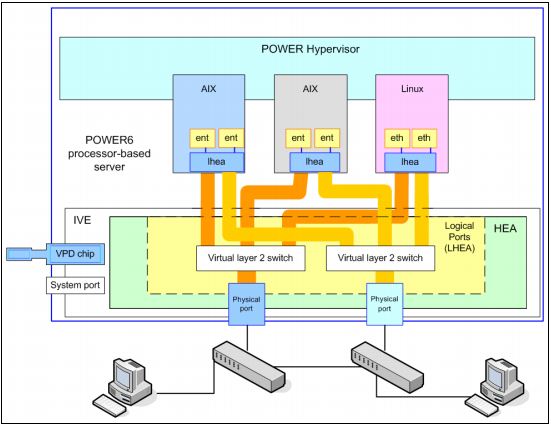
IVE is the collective name referring to a number of technologies including:
- Hardware - Host Ethernet Adapter
- Software components
- POWER Hypervisor functions


It offers:
- The Host Ethernet Adapter (HEA) is the major hardware component of the IVE.
  (HEA also includes all the logical ports and the virtual layer 2 switches and connects to the physical port.)
  (Once a logical port is assigned to LPAR, the LPAR operating system recognizes the HEA as the Logical Host Ethernet Adapter (LHEA).)
- Physical ports are also hardware components: Either two 10 Gbps Ethernet ports or four 1 Gbps ports or two 1 Gbps ports
- External network connectivity for LPARs using dedicated ports without the need of a Virtual I/O Server
- The speed and performance of the GX+ bus, faster than PCI Express

Depending on the IVE feature code installed, one or two physical ports are grouped into a port group. Any port group supports up to 16 LHEA ports. Each logical port can be assigned to any LPAR, and LPARs can have one logical port per physical port.


The major IVE concepts are defined as follows:
HEA: Host Ethernet Adapter, the key imbedded function located on the I/O controller chip.

LHEA: Logical Host Ethernet adapter, a logical representation of a physical HEA adapter. This is the parent device of an LHEA port.
    lhea0     Available       Logical Host Ethernet Adapter (l-hea)

LHEA port: Logical representation of a physical HEA port.
    ent0      Available       Logical Host Ethernet Port (lp-hea)

Port group: A Ggoup of logical ports that share one or two physical ports, depending from IVE feature code.
    Any IVE feature supports up to two port groups, and any port group supports up to 16 logical ports (LHEA port).


# lsdev -Cc adapter
ent0    Available       Logical Host Ethernet Port (lp-hea)
ent1    Available       Logical Host Ethernet Port (lp-hea)


root@vios1: / # lsslot -c slot
# Slot                    Description       Device(s)
HEA 1                     Logical I/O Slot  lhea0 ent0 ent1 ent2 ent3


root@aix14 / # entstat -d ent0 | grep Port
Logical Host Ethernet Port (l-port) Driver Properties:
Logical Port Link State: Up
Physical Port Link State: Up
Logical Host Ethernet Port (l-port) Specific Properties:
Logical Port Number: 1
Port Operational State: Up
External-Network Switch-Port Operational State: Up
External-Network-Switch (ENS) Port Speed: 1000 Mbps / 1 Gbps, Full Duplex


IVE can be used as SEA. IVE offers an internal layer 2 switch for LPAR to LPAR data traffic.
For a HEA port "promiscuous mode" can be set, which means that port is dedicated to a specific LPAR. (Then it is not possible to assign LHEA to another LPAR.)
------------------------

NETWORK - VLAN

BASICS OF VLANS:

A LAN is a local area network and is defined as all devices in the same broadcast domain. (Broadcast domain: Devices in the same subnet, so no device is needed to find each other) If you remember, routers stop broadcasts, switches just forward them.

As I said, a VLAN is a virtual LAN. In technical terms, a VLAN is a broadcast domain created by switches. Normally, it is a router creating that broadcast domain. With VLAN’s, a switch can create the broadcast domain.

This works by, you, the administrator, putting some switch ports in a VLAN other than the default VLAN (VLAN 1). All ports in a single VLAN are in a single broadcast domain.

Because switches can talk to each other, some ports on "switch A" can be in "VLAN 10" and other ports on "switch B" can be in "VLAN 10". Broadcasts between these devices will not be seen on any other port in any other VLAN, other than "VLAN 10". However, these devices can all communicate because they are on the same VLAN. Without additional configuration, they would not be able to communicate with any other devices, not in their VLAN.

Another important fact is that, on a Cisco switch, VLAN’s are enabled by default and ALL devices are already in a VLAN. The VLAN that all devices are already in is VLAN 1. So, by default, you can just use all the ports on a switch and all devices will be able to talk to one another.

---

VLAN is a technology used for establishing virtual network segments on top of physical switch devices. If configured appropriately, a VLAN definition can straddle multiple switches. Typically, a VLAN is a broadcast domain that enables all nodes in the VLAN to communicate each other without routing or bridging.
For example, two VLANs (VLAN 1 and 2) are defined on three switches (Switch A, B, and C). Although nodes C-1 and C-2 are physically connected to the same switch C, traffic between two nodes can be blocked. To enable communication between VLAN 1 and 2 some routing or bridging device is needed.


VLAN technologies:
-port based VLAN
-policy based VLAN
-802.1Q VLAN

# Port-based VLAN. A defined VLAN based on the port number of the switch. This is easy to configure but often limited to one single switch.

# 802.1q Tag VLAN. In 802.1q, the VLAN information is written into the Ethernet packet itself. Each packet carries a VLAN ID, called a tag. This allows VLANs to be configured across multiple switches. (The Ethernet frame size for tagged frames was increased from 1518 bytes to 1522 bytes and the Ethernet header format was slightly modified with the introduction of IEEE802.1Q.)

---------------------

What is 802.1Q VLAN?

Opposite to the port based vlan, the 802.1Q VLAN uses additional information in the Ethernet frame to differentiate network traffic. The additional information, called VLAN tag, is four bytes long and, optionally, can be inserted into the Ethernet frame.


Network nodes connected to the 802.1Q VLAN ports are expected to implement virtual network interfaces in order to explicitly specify VLAN IDs. A VLAN ID is a digit number ranging from 1 to 4094 (the VLAN ID 1 is used as the default value). An Ethernet frame that does not contain the VLAN tag information (or contains the VLAN tag information with null VLAN ID) is called an untagged frame. All untagged frames are grouped into a VLAN, called the default VLAN, regardless of the source physical ports, MAC addresses, or IP addresses.

If IP addresses with different subnets are assigned on VLAN interfaces, these VLANs can be seen as logically split subnets, even though a single physical network adapter on the node is connected to a single physical port. (A port that is used for multiple VLAN interfaces is generally called a trunk port.)

On node A, in addition to the base network interface, there are two VLAN interfaces defined; one is with VLAN ID 2, another is with VLAN ID 3. On Node B, a VLAN interface with VLAN ID 2 is defined.


To use 802.1Q VLAN, the following must be understood:
-VLANs with associated VLAN tag IDs must be defined on switches.

-Although it is possible to define multiple VLAN interfaces on a single network adapter, it is not always the best approach from the availability. Should the adapter or port fail, all VLAN interfaces become unavailable.


AIX support for 802.1Q VLAN

smitty vlan


root@aix2: / # lsdev -Cc adapter
ent0      Available 07-08 2-Port 10/100/1000 Base-TX PCI-X Adapter (14108902)
ent1      Available 07-09 2-Port 10/100/1000 Base-TX PCI-X Adapter (14108902)
ent2      Available 09-08 2-Port 10/100/1000 Base-TX PCI-X Adapter (14108902)
ent3      Available 09-09 2-Port 10/100/1000 Base-TX PCI-X Adapter (14108902)
ent4      Available       EtherChannel / IEEE 802.3ad Link Aggregation
ent5      Available       VALN
ent6      Available       VLAN


root@aix2: / # lsattr -El ent5
base_adapter  ent4 VLAN Base Adapter True
vlan_priority 0    VLAN Priority     True
vlan_tag_id   839  VLAN Tag ID       True

Some consideration:

- The VLAN ID added to the packets leaving the partition is removed only when entering the other partition if it matches with its PVID.
(The VLAN tag is not stripped off by the SEA because the VLAN ID does not match the PVID of the virtual Ethernet adapter in the SEA)

---------------------

What is trunking? What is a trunk port?
(http://publib.boulder.ibm.com/infocenter/tivihelp/v14r1/index.jsp?topic=/com.ibm.tivoli.tpm.net.doc/network/cnet_trunking.html)

When there is a link between two switches or a router and a switch that carries the traffic of more than one VLAN, that port is a trunk port. A trunk port must run a special trunking protocol. The protocol used would be Cisco’s proprietary Inter-switch link (ISL) or the IEEE standard 802.1q.

A trunk connection is a link that carries VLAN information between network devices. These devices could be two switches, a switch and a router, or even a switch and an end station. The advantage of the trunk is that through one connection, many VLANs can be transported between the two switches; therefore we do not have to implement a dedicated (and costly) connection for each VLAN. Trunking can dramatically improve the performance, manageability, and reliability for applications.

For example, let us assume, we have connected a link between the ports of two switches. If the switch ports defined on the switches are members of the same VLAN, the ports will pass any traffic only for the VLAN associated with their port connections. By default, the ports are in a non- trunk mode called an Access link. If you want the traffic to pass between multiple VLANs established on multiple switches, you will need to first establish a trunk connection between the switch ports.

Note: When a VLAN is split and the trunk connection is disabled between the two switches or endpoints, a single VLAN is divided into two new VLANs, one for each of the broadcast domains. All the switches in the domains are updated with the correct VLAN ID, based on which domain it was originally in. The NIC templates however do not get updated with the new VLAN ID information after the trunking is disabled between the switches. You will need to manually update the NIC templates, with information about one of the new VLAN IDs.


The main capabilities of trunking are:

-Aggregating multiple switches into a single logical trunk group, supports efficient high-speed communications throughout the network.
-Administrative workload is reduced, as the switches or devices connected using the trunk connection can be managed as a single entity rather than individually.
-Trunking significantly increases data availability. For example, even if an individual switch failure occurs, the input and output can continue at a reduced bandwidth as long as at least one switch or router in the trunk group remains available.

---------------------

What is VTP?

Unfortunately, if you have more than a couple of switches, configuring VLAN’s can be a real pain. To make life easier, Cisco developed VLAN Trunking Protocol (VTP). Let’s find out what VTP can do for you.

Say that you have 20 switches in your large office building. On each of these switches, you have four VLAN’s. Without VTP, you have to create each of these four VLANs on each of these switches. With VTP, you only have to create the four VLANs once, on one switch, and all other switches learn about the four VLANs.

In other words, the job of VTP is to distribute VLAN configuration information between all the switches.

The job of VTP is best explained from the perspective of the VTP server. All switches, by default, are VTP servers. The VTP server is where you would create, remove, or modify VLANs.

This VTP server sends an advertisement, across the domain, every 5 minutes or whenever a change is made in the VLAN database. That advertisement contains all the different VLAN names, VLAN numbers, what switches have ports in what VLANs, and a revision number. Whenever a switch receives an update with a larger revision number than the last one it applied, it applies that revision.

Keep in mind that VTP is a Cisco proprietary protocol. So, to use VTP between your switches, you must have all Cisco switches.

NETWORK - BASICS, PROTOCOLS

Basics - Protocols, Subnetting

TERMS:

host                    A computer attached to the network.
local host              The computer at which the user is working.
foreign or remote host  Any other computer in the network
server                  A host that contains the information to be accessed, it makes its resources available for other machines
client                  A host requesting services or data from another computer
internet                Heterogeneous networks connected together
port                    A port identifies the application on the host
socket                  A socket is a combination of IP Address, Protocol and Port Number
                        <protocol, source-address, local-port, destination address, destination-port>

loopback interface      it allows a client and serever on the same host to comm. with each other (127.0.0.1)
network address         IP address with all host address bits set to 0.
                        (This type of address is used in the routing table as the network destination address.)
broadcast address       IP address with all host address bits set to 1

Node                    In networks, a processing location. A node can be a computer or some other device, such as a printer.
                        Every node has a unique network address (often called as MAC address).
Domain                  It is a group of systems under the same administrative control

LAN

Local Area Networks are networks in a close geographical area:
    -Token-Ring (4 or 16 Mb/sec)
    -Ethernet (10 100 or 1000 Mb/sec)
    -FDDI (fiber optics) (100 Mb/sec)


TCP/IP LAYERING:

APPLICATION            It is a user process cooperating with another process on the same or a different host.
(e.g. HTTP)            FTP, HTTP, DNS, TELNET, SMTP, NFS ...

TRANSPORT              It provides for the end-to-end delivery of data. It is basically an interface for the application layer to IP.
(datagram, segment)    It uses ports. TCP (connection-oriented), UDP (connectionless)
(e.g. TCP protocol)

INTERNET               IP addressing, handles the routing of packets, packet fragmentation and reassembly
(packet)(e.g. inet0, en0)IPv4, ICMP, ARP

NETWORK ADAPTER        It is the connection to the actual network hardware.
(frame)(e.g. ent0)     Ethernet (en),IEE802.3 (et) Token-Ring (tr) ...

PHYSICAL               Responsible for specifying electrical, mechanical characteristics of the communication.
(e.g. copper)          RJ45, copper, Fibre ...


INTERNET ADDRESSING:

IP ADRESS CLASS    FORMAT        ADDRESS RANGE                        BITS
A                N.H.H.H        1.0.0.0-127.0.0.0                  0...............................
B                N.N.H.H        128.0.0.0-191.255.0.0              10..............................
C                N.N.N.H        192.0.0.0-223.255.255.0            110.............................


Class A, B and C addressses also provide address ranges that are useful to define a private network. A private network can have the followong address ranges:

A    10.0.0.0-10.255.255.255
B    172.16.0.0-172.31.255.255
C    192.168.0.0-192.168.255.255


PROTOCOLS:


ARP (Address Resolution Protocol)
ARP is responsible for converting IP addresses into physical machine addresses. It uses the broadcast facility to discover the hardware (physical) address. The broadcast is received by all hosts on the network but only one will recognize its own IP address and respond with an address resolution reply. All other hosts on the network discard the packet.

ARP maintains a table of mappings between IP logical addresses and network-specific physical addresses for network types where a single interface has multiple possible destination. When data is to be sent to the network, the destination hardware address is determined from the ARP table. If your host does not have the destination hardware addres in the ARP table, ARP on your system is used to obtain the address by broadcasting a request to the network.


ICMP (Internet Control Message Protocol)
ICMP is used to report errors in IP datagram processing. The most common use of ICMP is the PING command which sends out an ICMP echo request expecting an ICMP echo reply from the destination host.


UDP (User Datagram Protocol)
It is a transport protocol without flow control or error recovery. It simply for sending or receiving IP datagrams, using ports to direct the datagarams. UDP and IP do not provide any reliability, so it is up to the application program to provide for flow control and error recovery.
Applications which are using UDP: Domain Name Server (DNS), Remote Prosedure Call (RPC), used by Network File System (NFS)


TCP (Transmission Control Protocol)
TCP transfers a contiguous stream of bytes through the network. TCP assigns a sequence number to each byte transmitted and expects a positive acknowledgement from the receiving TCP. If the acknowledgement is not received within a timeout interval, the data is retransmitted. (FTP, TELNET, SMTP)


IP (Internet Protocol)
The IP is the layer that hides the underlying physical network bay creating a virtual network view. It contains addressing information and some control information that enables packets to be routed. IP routing is an important function of the IP layer. The IP routing mechanism only considers the IP network address part of destination IP addresses. Each host keeps an IP routing table. IP also fragments large size data and reassembles on the receiving side.

The difference between TCP and IP is, that TCP is responsible for the data delivery of a packet and IP is responsible for the logical addressing. In other words, IP obtains the address and TCP guarantees delivery of data to that address.

----------
           
SUBNETTING:
Subnetting is dividing a single network into multiple logical networks (subnets). A subnet address is created by borrowing bits from the host field and designating them as the subnet field. (So we need to know it is a Class A, B or C IP adress.) With subnetting, one address may be known to the Internet and internally the packets are distributed to the correct network.

Subnet mask (or Net mask)
The subnet mask tells the system what the subnet partitioning scheme is. A bit set to 1 in the subnet mask indicates that bit position is part of the network address portion of the IP address.

When a host sends a message to a destination, the system must determine whether the destination is on the same network or it must be reached through a gateway. The system compares the destination address to the host address using the subnet mask.

Example:
Class B address:172.16.0.0-->N.N.H.H.
We want 6 subnets, so we need to borrow 3 bits (2*2*2) from the host field.

|NETWORK ID............||HOST ID...........|
10101100    00010000    00000000    00000000        <-IP address
172        16                 0        0           

|SUBNETWORK ID............||HOST ID........|
11111111    11111111    11100000    00000000        <-Subnet mask
255        255              224        0           


172        16                32        0
10101100    00010000    00100000    00000000        <-1st subnet

172        16                32        1
10101100    00010000    00100000    00000001        <-1st host in this subnet

172        16                63        255
10101100    00010000    00111111    11111111        <-subnet broadcast


172        16                64        0
10101100    00010000    01000000    00000000        <-2nd subnet

172        16                64        1
10101100    00010000    01000000    00000001        <-1st host in this subnet

172        16                95        255
10101100    00010000    01011111    11111111        <-subnet broadcast


PORTS AND SOCKETS:


In this example, the source host is communicating through a dynamically assigned port, 1064, and the destination host is contacted through port 21. However, since they are using different IP addresses, the connection is unique.

This unique connection is called a socket. A socket is composed of four components: the source address, the source local port, the destination address, and the destination port. A socket is also referred to as a communication endpoint

/etc/services         defines the port for a socket and the protocols used for networking services (after modification: refresh -s inetd)
/etc/inetd.conf       the inetd daemon checks all of the ports specified in the /etc/inetd.conf file for incoming requests
/etc/hosts            host names and their IP addresses are mapped here


TCP/IP COMMUNICATION

The advantage of dividing the network communication process into layers is that each layer can assume responsibility for different aspects of the communication process. From the user's point of view, one application is communicating with another application. Logically, however, each layer communicates with the corresponding layer on the remote host.


The communication task is to exchange data between two applications. The systems on which the applications are running can be on the same LAN or on opposite sides of the world. The TCP/IP communication process remains the same.

When data leaves the source application, the TCP adds header information for the TCP at the destination. This identifies the destination program and includes checksums to ensure data integrity and sequence numbers so that packets are reassembled in the correct order

An IP datagram is the basic unit of information passed across the network. It contains the source and destination address along with the data from the transport layer. The IP is responsible for routing this datagram to the destination network

The network interface layer packages the data for transmission across the physical media. This is called a frame. The size and format of a frame varies among different types of networks.

A datagram can be larger than the maximum frame size for a particular type of network. These datagrams are fragmented by the network interface into multiple frames. Each frame is sent, and the receiving network interface reassembles the frames before passing the datagram to the IP layer on the destination host

The IP layer on the destination host begins the process of removing the header for that layer. It removes the header, checks for accuracy, and passes the datagram to the next layer.

At the final stage, the TCP or UDP receives the datagram from the IP layer and sends it to the appropriate port on the destination application. This completes the communication process.